Organize and Publish: 50 Editable Canva Templates for KDP
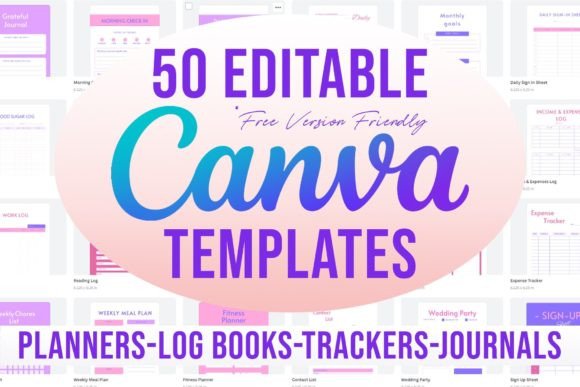
For independent publishers and digital creators, the gap between a brilliant idea and a polished, market-ready product often comes down to layout design. You might have the content for a comprehensive fitness planner or a wedding organizer, but wrestling with bleed margins, page dimensions, and type hierarchy can stall the publishing process. This is where having a reliable set of 50 Editable Canva Templates 6x9 for KDP changes the workflow. It removes the technical guesswork, allowing you to focus entirely on the content and branding of your next journal or log book.
The true value of this collection lies in its versatility and accessibility. We are not talking about rigid files that require expensive software subscriptions to modify. These are native Canva files designed to be edited entirely within the platform's free tier. There are no premium elements locked behind a paywall, meaning you can customize every aspect of these design assets without incurring extra costs. The collection spans a massive range of utilities, from the Monthly Plan and Daily Schedule to specialized trackers like the Blood Sugar Log and Reading Log. This breadth makes it an essential toolkit for anyone looking to populate their Amazon KDP storefront quickly.
The Anatomy of a 6x9 Low-Content Book
The 6x9 inch size has become a standard in the low-content publishing world for good reason. It strikes a balance between portability and writing space, making it the ideal footprint for a Daily Personal Planner or a Productivity Planner. However, designing for this specific trim size involves more than just setting a canvas size. It requires an understanding of print logistics, specifically regarding the "bleed."
The 50 Editable Canva Templates 6x9 for KDP come pre-configured with the necessary bleed settings. In editorial design, bleed is the area of design that extends beyond the trim edge of the page. If you are creating a 12 Months Calendar or a Budget Tracker with a background color that reaches the edge of the paper, you must have this extra margin. Without it, the white paper fibers might show at the edge due to slight shifts during the printing process. By using these templates, you ensure that your Expense Tracker or Wedding Contacts book looks professional and adheres to KDP’s strict upload requirements.
From a modern typography perspective, these templates offer a clean slate. While they provide structure, they do not force a specific aesthetic. Whether you are building a Grocery List notepad or a Meeting Notes journal, the layout serves as a foundation. You can apply your own brand identity by swapping out fonts and colors, effectively turning a generic template into a unique product that stands out in a crowded marketplace.
Streamlining Workflow: From Click to Copy
One of the most practical features of this bundle is the delivery method. Instead of downloading a zip file of static PDFs, you receive a master document with clickable links. This approach mimics a professional design studio's workflow. You simply browse the list—perhaps you need the Work Schedule for a niche business planner or the Wedding Party template for a bridal gift—and click the link to open it directly in Canva.
The instruction to "make a copy" is crucial for brand consistency. By duplicating the file to your own account, you create a master version. This is particularly useful if you are building a series. For example, if you are creating a health and wellness line, you might use the Fitness Planner, Weekly Meal Plan, and Habit Tracker to create a cohesive set. Because the base structure is consistent across the 6x9 format, your customers will recognize the visual hierarchy, even if the specific content differs between a Weight Loss Journal and a Recipe Book.
This method also solves the issue of version control. When you edit a Daily Journal template, you aren't altering the original file. You are working on your own iteration. This allows for experimentation with font pairing—perhaps mixing a clean sans serif font for headers with a handwritten font for prompts—without fear of ruining the source material.
Visual Style and Customization Potential
While the list includes functional items like a Sign Up Sheet, Order Form, and Contact List, the potential for visual enhancement is significant. These templates are designed with neutrality in mind, which is a strategic advantage. A blank Notes page or a Monthly Goals spread can be transformed to fit any aesthetic, whether it is minimalist, retro, or corporate.
Consider the Password Tracker or the Emotions Log. These are deeply personal items. By customizing the typeface and color palette, you can change the "personality" of the book. A stark, geometric sans serif font might appeal to a tech professional organizing their digital life, while a softer, rounded script font might suit a gratitude journal intended for self-care.
For those in the packaging design and product creation space, these interiors are just half the battle. However, they dictate the cover design. The 6x9 format with bleed ensures that when you design the cover for your Grocery List or Reading Log, the interior pages will align perfectly with the physical product. This consistency is vital for professionalism and customer satisfaction. A well-designed interior reduces returns and bad reviews, which is the lifeblood of a KDP business.
Niche Applications and Market Strategy
The diversity of the 50 templates allows for targeted market strategies. You aren't just selling "planners"; you are solving specific problems.
- For the Event Planner: Utilize the Wedding Contacts, Wedding Party, and Sign Up templates to create a specialized bridal binder. Add value by including the Monthly Planner for countdowns.
- For the Health Enthusiast: Bundle the Fitness Planner, Medication Log, Blood Sugar Log, and Plant Tracker (for mental wellness) into a comprehensive wellness journal.
- For the Corporate Professional: Combine the Meeting Notes, Work Log, Work Time Log, and Productivity Planner into a high-end executive organizer.
Because these are editable Canva templates, you can adjust the visual hierarchy to suit the content's complexity. A Budget Tracker requires clear grid lines and distinct sections for numbers, whereas a Daily Gratitude page might benefit from open white space. You can manipulate the visual hierarchy by enlarging headers or bolding specific prompts to guide the user's eye, ensuring the book is not just beautiful, but functional.
Licensing and Commercial Usage
A common concern with design assets is the licensing. Since these templates use only free Canva elements and standard fonts, the barrier to commercial use is lowered. You are not reselling the template file itself; you are selling the physical or digital end-product (the printed book or the filled-in PDF).
This makes the 50 Editable Canva Templates 6x9 for KDP a low-risk, high-reward investment. Whether you are a graphic designer looking to speed up client deliverables or a hobbyist looking to start a side hustle, the ability to modify and sell without complex licensing fees is a significant advantage. The focus remains on creation—taking the Daily Planner structure and turning it into a product that helps people organize their lives.
Ultimately, this collection is a utility kit. It strips away the friction of file setup and bleed management, leaving you with the creative work: choosing the right serif font for a vintage look, selecting a modern typography style for a tech journal, and building a library of low-content books that can generate passive income for years to come.